

Introduction
LinkedIn is an important tool to help students advance in their career. The course “Learning LinkedIn for Students” by Oliver Schinkten will help students to learn how to take advantage of its features.
Create a LinkedIn Profile
When setting up an account, navigate the LinkedIn sign up page. Follow the steps and fill in the information they ask you for. LinkedIn will suggest other users that you can connect with. This is based on the information that you filled in for your profile. Including a profile picture will results in more page views (Schinkten, 2018). Make sure the picture is recent, high quality, professional and cropped to your face. A background image will also help make your profile stand out. Pictured below is a comparison of profile pictures. Bad on the left and good on the right.

Adding work experience is also an important part of a LinkedIn profile. You can include information such as the title, company, and duration of the job. You should also include a description of the job. Schinkten (2018) suggests using bullet points to display the skills you gained. Volunteer experience can also be included to help your profile stand out. The education section is essential to a student’s profile. School, degree, major, clubs, extracurriculars, honors and awards can all be listed in this section.

Skills will help to boost your profile to potential employers, as users with more than 5 skills are 27 times more likely to appear in searches (Schinkten, 2018). These skills can also be endorsed by other users who know that you have those skills. Endorsements can be very influential for your profile. Schinkten (2018) recommends that you ask collaborators to endorse your skills for you. You can also ask for recommendations from instructors and bosses. These are more in depth and like a letter of recommendation. There are also extra sections for:
- Publications
- Certifications
- Patents
- Courses
- Projects
- Honours & Awards
- Test scores
- Languages
- Organizations
A public LinkedIn profile means that someone will be able to see parts of your LinkedIn profile without having an account. When editing your public profile, you can choose what parts you would like to show. Having everything shown will increase the chance of being noticed by potential employers. The URL can also be changed to make it easier to share your profile.
Build Your Network
A professional network will provide you with knowledge and create more career opportunities. To start building a network on LinkedIn, there are three types of people you should connect with. The first is an advocate, which is someone you know personally such as a friend or family member. Next is the strategic “In”, which is someone you know on a professional level and is willing to make new connections for you. This could be an instructor or a former boss. Finally, there is the subject matter expert. They will offer insight into an industry and is someone who has a similar job and goals.
When connecting with someone, it is a good idea to add a note about why you want to connect with them. LinkedIn will suggest other connections based on information in your profile. LinkedIn has many search filters that will get to the specifics that you are looking for. This can be through keywords, location, industries and more. Boolean modifiers and search operators can also be used to narrow down searches even further.
University pages have a “see alumni” tool that will give insight on alumni of that school. It allows you to select location, industry, major and skills of the user. This will help to fine tune the alumni that you may want to connect with. You can also join groups to make more connections as well. These will help you connect with others that share the same interests or work in the same industry as you.
Using LinkedIn Day-to-Day
The LinkedIn newsfeed will show content shared by connections. The algorithm will learn what type of content that you enjoy the most. You can also follow companies, schools and influencers to make your newsfeed more relevant to you. LinkedIn is a strong tool for a positive digital footprint. This will boost the image of you that employers will see.

Sharing posts to the feed will provide to your network and give you an active presence on the site. You can post text, videos, photos and links of things that relate to your industry. Make sure the posts are professional, appropriate and build a positive personal brand. LinkedIn can also be a blogging platform. This will let you create long form posts where you don’t need to create a separate website. Schinkten (2018) recommends using Canva to create images for the top of a blog post.
The messaging feature makes it easier to communicate and collaborate with your connections. You can only message people who are your connections, but premium members can use InMail to communicate. LinkedIn learning is a tool available to premium accounts. Through this, you can take online courses on various subjects in your industry.
Job Search and Company Research
LinkedIn is a great tool for job searching. You can visit a company’s page to see job postings that are tailored to your account. It’s also good to learn more about the company and what they are all about. Premium users can look at company insights such as employee count by department, new hires, and job opening data.

You can also search with keywords for jobs through LinkedIn. This type of search also has many filters, such as location, date, and experience level. Some posting will have an “easy apply” button that uses your LinkedIn profile as the application. You can also edit your career interests tab to show recruiters that you are looking for a new position. Job alerts can also be set up for roles that you are interested in.
Manage Your LinkedIn Account
A premium LinkedIn account will give you access to more features and tools to take advantage of. This includes things like InMail, company insights and more. There are different types of premium accounts for your different goals. These are career, business, sales, and hiring accounts. Schinkten (2018) suggests managing your privacy and account settings. This includes whether your network can see profile edits and what others will see you as when you view their profile. It is also a possibility to download and archive your LinkedIn account before closing your account.
Conclusion
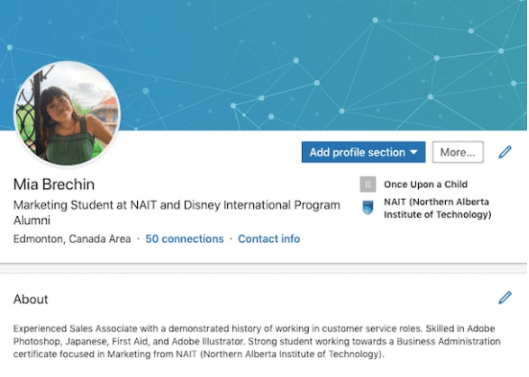
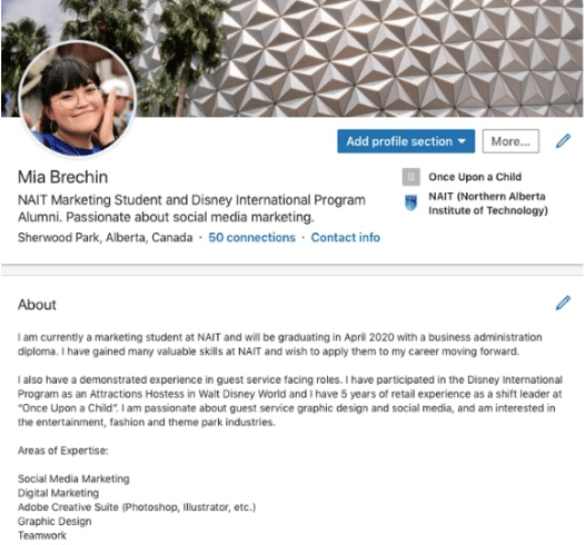
Here is a before and after of my LinkedIn profile using these tips. I added a background image that relates to the theme park industry, which I am interested in. I changed my profile picture to be higher quality and cropped closer to my face. I also made improvements to my headline and summary to add more keywords. Even by glancing at the profiles, the difference is immediately evident.
References
Schinkten, O. (2018, October 18). Learning LinkedIn for Students. Retrieved from LinkedIn Learning: https://www.linkedin.com/learning/learning-linkedin-for-students/welcome?u=2109516
 Citizen Media